AndroXplorer Pro File Manager
AndroXplorer Pro has built-in root explorer, supports seamless integration of encryption technology into a wide variety of archive formats, supports password database file, import and export to third party password manager such as KeePass 2, kdbx.
AndroXplorer Pro supports a wide ranging of archive formats.
For compression and extraction, AndroXplorer Pro supports Zip, 7Z, GZIP, TAR, BZIP2, XZ, WIM.
For extraction only, AndroXplorer Pro supports LZH**, ARJ, CAB, CHM, CPIO, CramFS, DEB, DMG, FAT, HFS, ISO, LZMA, MBR, MSI, NSIS, NTFS*, RAR, RPM, SquashFS, UDF, VHD, WIM, XAR, Z*Note: NTFS quoted here is the NTFS archive not the NT File System used in SD Card.
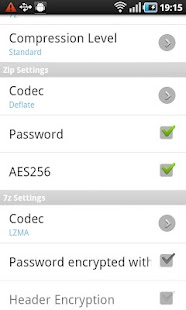
Options available for Zip encoding are Deflate, Deflate64, LZMA, PPMd and BZip2 while the variety of encoding choices for 7z are LZMA, LZMA2, PPMd and BZip2.
Support extraction of multiple-volume RAR archive.
Create and extract of multiple-volume 7z archive.
AES encryption supported for Zip and 7z.
AndroXplorer Pro v.
4 has been rigorously tested on large archive and also on archive with a lot of items.
We have tested archive with up to around 100k of items without any issue, but the end result might vary from device to device, it depends on the memory capacity of each device and some other factors.AndroXplorer Pro also supports Unicode in Zip.
For Q&A and our reply to your comments please visit our forum at http://goo.gl/cWvmu
The following list highlights many features of AndroXplorer Pro.
• Three fully independent views to manage, sort or display files and folders.
Each view is powered by advanced media cached system that enables it to display the thumbnails, size, date, name of files and folders instantly.
Four display modes available for each view along with four sorting options.
Smooth and easy transition from view to view by flicking or dragging the view left or right.
• Each view in AndroXplorer Pro has list of the parent folders, sorting list and selection bar that will appear once a selection has been made.
• To manage your installed applications, AndroXplorer provides My Programs.
This feature aggregates all installed applications within a single folder.
Tap on an application within the folder to activate, to see the properties or to get more information from the market.
Options also available to uninstall and performing backup where it is applicable.
• Shortcuts feature in AndroXplorer Pro is very easy to use, it enables you to create shortcuts to files and folders from any folder within a view.
The shortcuts are then saved in a folder for future references.
In the phone, add-shortcut command is available at the additional sub-menu on the right-bottom of the screen.
• AndroXplorer Pro also has built-in fast file search based on simple pattern or Regular Expression.
Searching under AndroXplorer Pro v.
4 is very fast and responsive due to the new implementation of advanced search module.
• Reliable WiFi network file sharing supporting SMB servers with auto scan function that can be started and stopped with a touch of the refresh button.• Instant display of thumbnails of media file and other Mime type after caching.
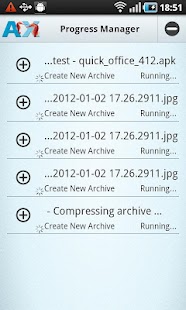
Media file display requires the support of the media and also at least the device must be running Froyo.• Six high resolution themes to suit your mood.• Progress manager to manage multiple file operations concurrently.
• Root support for users with rooted device.• Recycle bin for files in SD Card• Backup and Restore shortcuts and servers information• Collapsible dashboard and Breadcrumbs dashboard items for tablet• LAN Streaming for video/audio files• Built-in text editor supports character encoding
About AndroXplorer Pro File Manager
- Package name (App ID)
- net.adisasta.androxplorerpro
- Available on
- Google Play
- Price
- Free
- Version
- v4.6.3.8
- Developer
- ELECOM CO.,LTD.
Looking for the AndroXplorer Pro File Manager APK?
The safest way to get AndroXplorer Pro File Manager (net.adisasta.androxplorerpro) on your Android device is to install it directly from Google Play — you'll always get the latest official version, automatic updates, and no risk of modified or infected APK files from third-party sites.
Music Features
Enjoy high-quality music streaming and playback features.
Social Features
Connect and share with friends and the community.
Gaming Features
Enjoy immersive gaming experience with various game modes.
See AndroXplorer Pro File Manager in Action

Frequently Asked Questions
Is AndroXplorer Pro File Manager free?
Yes, AndroXplorer Pro File Manager is free to download and install on Android through Google Play.
How do I install AndroXplorer Pro File Manager on Android?
Open Google Play on your Android phone or tablet, search for AndroXplorer Pro File Manager by ELECOM CO.,LTD. or tap the Google Play button on this page, then tap Install. The app downloads and installs automatically.
What is net.adisasta.androxplorerpro?
net.adisasta.androxplorerpro is the App ID (package name) of AndroXplorer Pro File Manager on Google Play. Every Android app has a unique package name, and it is the safest way to verify you are installing the official app.
Is AndroXplorer Pro File Manager safe to download?
Installing AndroXplorer Pro File Manager from Google Play is the safest option: you get the official version published by ELECOM CO.,LTD., verified by Google Play Protect, with automatic updates. Avoid APK files from unofficial third-party sites.

Get AndroXplorer Pro File Manager Today
AndroXplorer Pro File Manager for Android — free download on Google Play.
Compatible with Android phones and tablets — available on Google Play.
Ask AI about this app
Get instant answers about features, tips and more from popular AI assistants.